


Client intake
Start with the couple's details.
Their answers become the starting point you refine.
Start from a template
The couple fills the rest
 Flows into your shot list
Wedding Desk keeps your Timeline, Shot List, gear and wedding-day contacts together in one plan for photographers and videographers.
Request beta accessWedding Desk puts it in one.
Where does bridal prep start?
123 Main St, makeup from 9:00 AM
Family situations to know?
Keep both parents separated…
Anytime shots
Don't forget the 70-200mm lens. Sun sets at 7:15 PM.
DJ Mark: RE: Final timeline v4
Wedding timeline
Times, locations, contacts, gear and timeline moments.
Shots linked to Timeline moments
Each shot stays beside the moment it belongs to.
Day contacts
Coordinator, venue, DJ, officiant and team at hand.
Gear check
Packed and checked before you leave.
On The Day
A clear view for the wedding day itself.
Their answers become the starting point you refine.
Start from a template
The couple fills the rest
Flows into your shot listSee your upcoming weddings and the next action for each project.

Add and refine your shots, then link each one to the Timeline moment it belongs to.
 Linked to Golden hour · 7:45 PM
Add your gear, mark critical items and link equipment to Timeline moments when needed. Check the list before leaving.
 70-200mm - packed
Use the Timeline to review the complete wedding-day schedule. Every moment can hold its own shots and gear. Move a moment and its linked details move with it.

Open the wedding plan on your phone or tablet when the wedding day starts. The Timeline and planned shots are ready in On The Day.
Project Overview brings notes, planning checks and the timeline together before the wedding day.

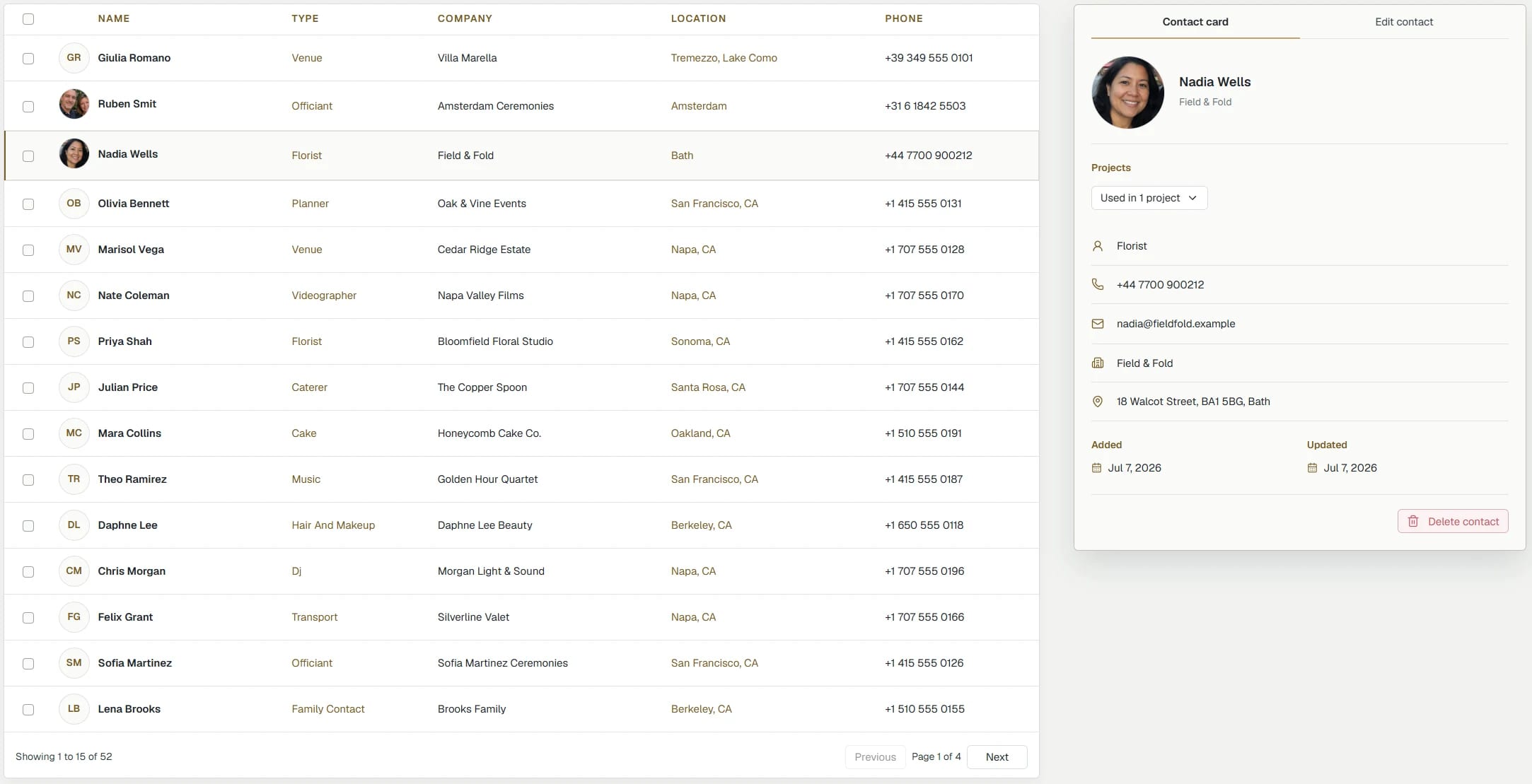
The people you need on the wedding day: coordinator, venue, DJ, officiant, second shooter and key family, with notes where you need them.
Before the wedding, Wedding Desk brings the timeline, shots, gear and important client details into one clear plan, so you can see what is ready and what still needs attention.
On the wedding day, open that plan on your phone to see the current moment, what comes next and the shots to capture. If the day runs late, shift the timeline once and continue from the updated plan.
Wedding Desk Go is version 1.0 and is available now. Prepare the timeline, shots and gear, use the same plan from your phone on the wedding day, and print or save it as a PDF.
Wedding Desk Solo will be version 2.0. It includes everything in Wedding Desk Go and also lets you collect answers from clients, keep contacts and locations together, see what still needs attention, and prepare the work you do after the wedding.
Wedding Desk Team will be version 3.0. It includes everything in Wedding Desk Solo and lets photographers, videographers and assistants work in the same wedding plan. You decide who can join and what each person can see or change.
Wedding Desk is built for wedding photographers and videographers who want to arrive well prepared, keep the wedding day clear and organised, and give their full attention to capturing the moments their clients are trusting them with.
No. It can handle prices, quotes and invoices around a wedding, but it does not send contracts, collect signatures or chase new leads. Its job is to help you prepare each wedding, keep the plan close while you shoot, and track what is left before delivery.
Wedding Desk Go is planned at $19 per month, Wedding Desk Solo at $29, and Wedding Desk Team at $59. Annual billing gives one month free.
No. Your projects stay saved when your subscription is paused, so you only pay for the months you actually use.
Yes. Start with a Wedding Desk Starter Template, adjust it to the way you work, and save your own reusable plan for future weddings. Timeline moments and Shot List items stay linked, so you do not have to rebuild the same preparation every time.
Yes. Every Wedding Desk plan includes private printing and PDF export. You can keep a copy of the wedding plan, print it when needed and use it outside Wedding Desk.
Yes. Wedding Desk works in your browser on your phone, tablet and desktop, so you can use the same wedding plan wherever you are. A dedicated mobile app is planned soon.
Wedding Desk Go is live in beta right now, and access is free. Send me a message through the contact form to request your account. Wedding Desk Go, version 1.0, is the first version available.
I created a wedding quote calculator as my gift for wedding photographers and videographers.
The calculator is free to use.
Access is free during beta. Send me a message to request your account.
